실전 · CH06
미니 프로젝트: 11월 매출 리포트
매니저 에이전트가 분석가 에이전트에게 숫자를 물어 리포트를 정해진 모양(MonthlyReport)으로 돌려줍니다. 코드는 그 객체로 마크다운 파일을 만들고, 마지막에 숫자를 원본 계산과 대조합니다.
1. 구조
리포트 매니저output_type=MonthlyReport
ask_analystanalyst.as_tool()
매출 분석가get_revenue · get_target
4장의 핸드오프와 달리 매니저가 끝까지 주도권을 가집니다. 분석가에게 여러 번 묻고, 받은 숫자로 표를 채워 최종 답을 씁니다.
2. 전체 코드
06_project.py
"""미니 프로젝트: 매니저 에이전트가 분석가를 '도구처럼' 불러 11월 리포트를 만든다."""
import setup_model  # 무료 Gemini 키로 연습할 때만 동작합니다(자료실 참고)
from pathlib import Path
from pydantic import BaseModel
from agents import Agent, Runner, function_tool
from sales_data import revenue_by, monthly_target


@function_tool
def get_revenue(group_by: str, month: str = "") -> dict:
    """매출 합계. group_by는 branch/product/month, month는 '2026-11' 형식(비우면 전체)."""
    return revenue_by(group_by, month)


@function_tool
def get_target(branch: str) -> dict:
    """지점의 2026년 11월 매출 목표(원). branch는 강남점/홍대점/판교점."""
    return monthly_target(branch)


class BranchRow(BaseModel):
    branch: str
    revenue: int
    target: int


class MonthlyReport(BaseModel):
    month: str
    branches: list[BranchRow]
    best_product: str
    summary: str


analyst = Agent(
    name="매출 분석가",
    instructions="도구 결과 숫자만 그대로 전달해. 추정하지 마.",
    tools=[get_revenue, get_target],
)

manager = Agent(
    name="리포트 매니저",
    instructions=("2026-11 리포트를 만든다. 지점별 매출과 목표, 상품별 매출은 반드시 분석가에게 물어서 받는다. "
                  "분석가가 알려 주지 않은 숫자나 상품 이름은 쓰지 않는다."),
    tools=[analyst.as_tool(tool_name="ask_analyst", tool_description="매출·목표 숫자를 물어본다")],
    output_type=MonthlyReport,
)

result = Runner.run_sync(manager, "2026년 11월 매출 리포트를 만들어 줘.", max_turns=15)
report: MonthlyReport = result.final_output

lines = [f"# {report.month} 매출 리포트", "", "| 지점 | 매출 | 목표 | 달성률 |", "|---|---:|---:|---:|"]
lines += [f"| {b.branch} | {b.revenue:,} | {b.target:,} | {b.revenue / b.target * 100:.1f}% |"   # 달성률은 코드가 계산
          for b in report.branches if b.target]
lines += ["", f"- 가장 많이 팔린 상품: {report.best_product}", f"- 요약: {report.summary}"]
Path("report_2026-11.md").write_text("\n".join(lines), encoding="utf-8")
print("\n".join(lines))

# 검증: 에이전트가 쓴 숫자를 원본 계산과 대조합니다
truth = revenue_by("branch", "2026-11")
for b in report.branches:
    real = truth.get(b.branch)
    if real is None:
        print(f"검증 {b.branch}: 없는 지점 이름")
    else:
        print(f"검증 {b.branch}: " + ("OK" if real == b.revenue else f"다름(원본 {real:,})"))
best = next(iter(revenue_by("product", "2026-11")))   # 원본에서 11월 매출 1위 상품
print(f"검증 1위 상품: " + ("OK" if report.best_product == best else f"다름(원본 {best})"))
missing = sorted(set(truth) - {b.branch for b in report.branches})
if missing:
print("검증: 리포트에 빠진 지점", missing)analyst.as_tool(...)— 분석가 에이전트를 매니저의 도구 하나로 만듭니다.- 지시문에 "분석가가 알려 주지 않은 숫자나 상품 이름은 쓰지 않는다"를 넣었습니다. 처음에는 이 문장 없이 돌렸는데, 지점 숫자는 맞으면서 1위 상품을 "프리미엄 패키지 A"라는 없는 상품으로 지어냈습니다(실제 Gemini 실행). 그래서 지시문을 고치고, 1위 상품도 검증하게 했습니다.
- 달성률은 코드가 계산합니다. 에이전트에게는 매출과 목표만 받습니다.
max_turns=15— 기본값은 10입니다. 분석가에게 여러 번 묻는 구조라 넉넉히 줍니다. 넘으면MaxTurnsExceeded예외가 납니다.- 파일 저장은 코드가 합니다. 에이전트에게는 데이터만 받고, 파일 형식은 우리가 정합니다.
- 마지막 검증은
revenue_by()를 직접 불러 리포트 숫자와 비교합니다.
3. 실행합니다
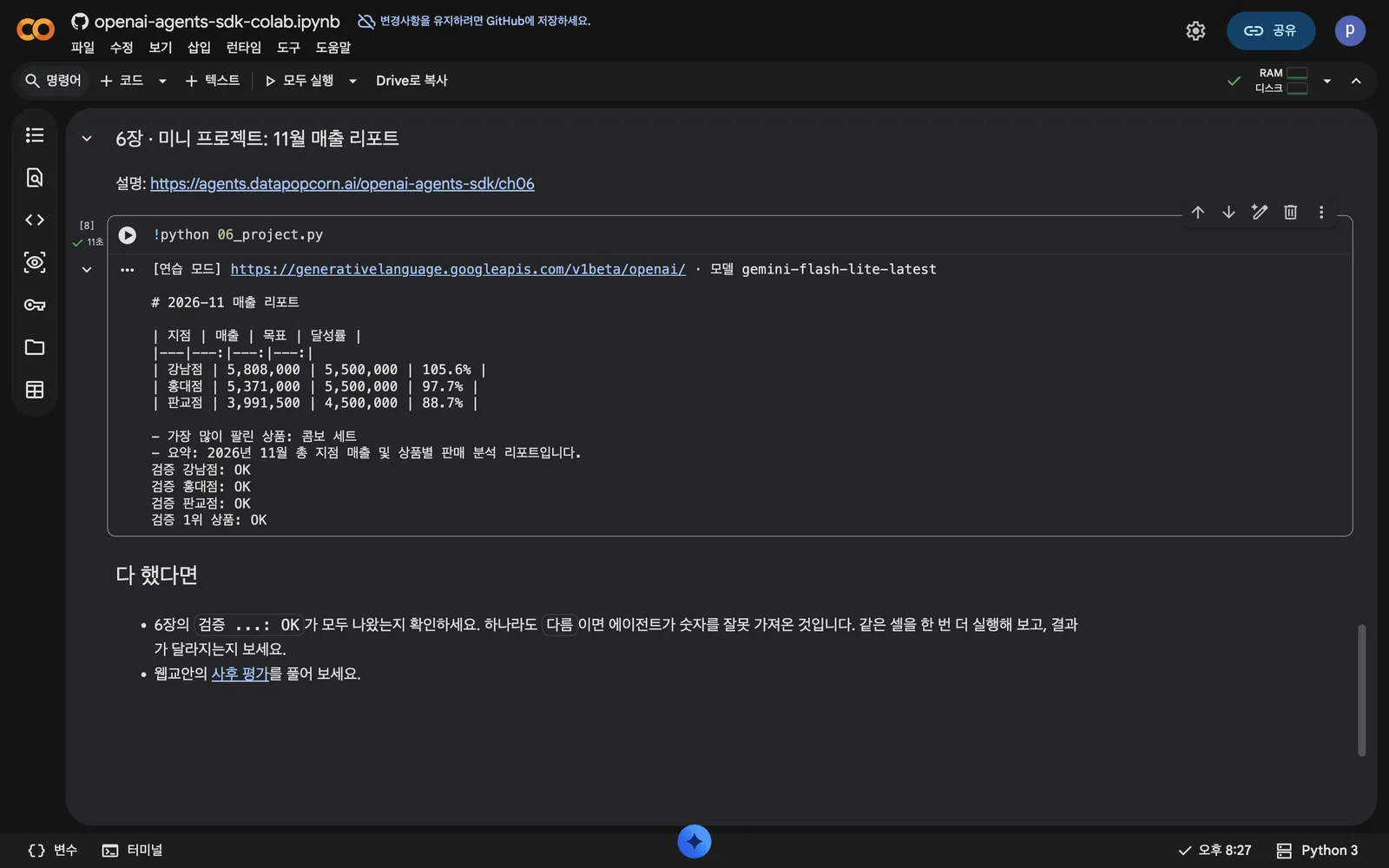
python 06_project.py# 2026-11 매출 리포트
| 지점 | 매출 | 목표 | 달성률 |
|---|---:|---:|---:|
| 강남점 | 5,808,000 | 5,500,000 | 105.6% |
| ... |
- 가장 많이 팔린 상품: 콤보 세트
- 요약: ...
검증 강남점: OK
검증 홍대점: OK
검증 판교점: OK
검증 1위 상품: OK
4. 정답표
네 줄 모두 OK가 나와야 합니다. 달성률은 아래와 같아야 하고, 11월 1위 상품은 콤보 세트(7,404,000원)입니다. 이름이 틀리거나 빠진 지점이 있으면 검증 코드가 "없는 지점 이름", "리포트에 빠진 지점"으로 알려 줍니다.
실제로 겪은 일: 처음에는 달성률도 모델이 계산하게 했습니다. 작은 로컬 모델로 매니저 → 분석가 구조를 돌렸더니 매출·목표 숫자는 분석가 도구에서 정확히 받아 왔지만, 홍대점 달성률을 97.7%가 아닌 97.3%로 계산했습니다. 그래서 지금 코드는 달성률을 Python이 계산합니다. 숫자 계산은 모델에게 맡기지 않는 것이 원칙입니다.
| 지점 | 11월 매출 | 11월 목표 | 달성률 |
|---|---|---|---|
| 강남점 | 5,808,000 | 5,500,000 | 105.6% |
| 홍대점 | 5,371,000 | 5,500,000 | 97.7% |
| 판교점 | 3,991,500 | 4,500,000 | 88.7% |
스스로 점검
5. 더 해 보기
- 상품별 11월 매출 표도 리포트에 넣어 보세요.
MonthlyReport에 칸을 추가하고 검증 코드도 함께 늘립니다. - 5장의 가드레일을 매니저에 붙여 "고객 명단 뽑아 줘" 같은 요청을 막아 보세요.
이것만 기억하세요
매니저가 전문가를 as_tool로 부르는 구조는 결과를 한곳에서 정리할 때 씁니다. 결과는 output_type으로 받고, 파일은 코드가 만들고, 숫자는 원본과 대조합니다.